In the fast-paced world of eCommerce, having access to the right data is the difference between simply surviving and thriving. After all, how can you optimize your eCommerce business if you don’t understand your users’ behaviors, preferences, and interactions with your website?
- What Are eCommerce Analytics Tools Used For?
- The Top eCommerce Analytics Tools at a Glance
- 1. Google Analytics 4 (GA4): Best free comprehensive tool
- 2. Hotjar: Best for user-centric insights
- 3. Clicky: Best for real-time visitor insights
- 4. Contentsquare: Best for in-depth customer journey analysis
- 5. Mixpanel: Best for event-based tracking
- How to Choose Your eCommerce Analytics Stack in 2026
The key to unlocking these insights lies in eCommerce analytics tools, which equip businesses with the information they need to understand customer demographics, track website traffic sources, optimize marketing campaigns, target specific segments, and drive strategic decision-making.
With global retail eCommerce sales projected by researchers to surpass an astonishing $8 trillion by 2026, it’s never been more important for businesses to capture their slice of the pie. However, the sheer amount of software on the market, coupled with new privacy regulations and AI advancements, can make choosing the right solution a challenge.
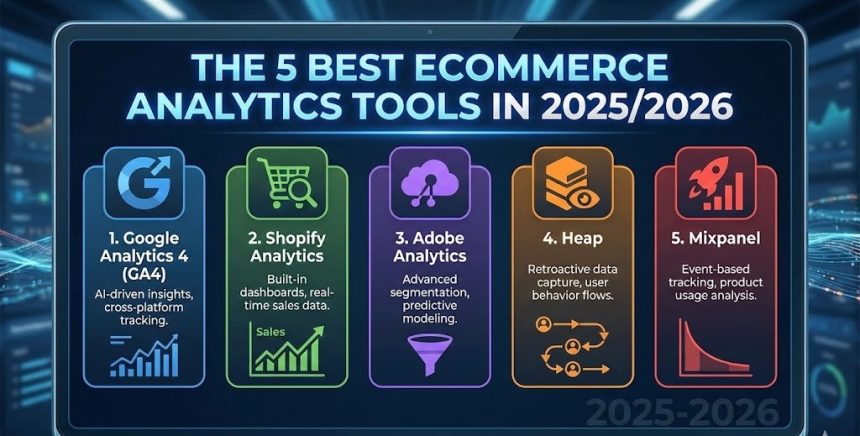
Here are the top 5 analytics tools so you can find the one that’s best suited for your business.

What Are eCommerce Analytics Tools Used For?
eCommerce analytics tools help businesses dive deep into customer behavior, sales data, and key performance indicators (KPIs). Armed with this knowledge, you can uncover insights that guide decisions across your entire operation:
- Analyze Product Performance: Identify best-selling and underperforming products. This is essential for inventory management, marketing adjustments, and financial planning.
- Track Customer Behavior: Understand how consumers interact with your store. Analytics track user behavior to provide insights into preferences and pinpoint roadblocks (like complicated checkout forms) that deter purchases.
- Improve Conversion Rates: The ultimate goal of analytics is to boost your conversion rate. By analyzing data, an eCommerce business can make informed decisions that enhance customer satisfaction and increase sales.
The Top eCommerce Analytics Tools at a Glance
| Tool | Best For | Starting Price | Key Differentiator |
| Google Analytics 4 | Comprehensive quantitative data | Free | Machine learning & predictive insights |
| Hotjar | User-centric visual insights | Free (Basic) | Heatmaps and session recordings |
| Clicky | Real-time visitor tracking | Free (Basic) | Granular, live-action visitor tracking |
| Contentsquare | Enterprise journey analysis | Custom Quote | AI-powered “frustration scoring” |
| Mixpanel | Event-based behavior tracking | Free (Basic) | Interactive funnels and retention tracking |
1. Google Analytics 4 (GA4): Best free comprehensive tool
As the industry standard for web tracking, Google Analytics 4 gives businesses a comprehensive overview of customer data, user interactions, marketing effectiveness, and overall performance. Unlike its predecessor (Universal Analytics), GA4 is built around “events” rather than just pageviews, making it much more flexible for modern eCommerce.
- 2026 Edge: GA4 now heavily incorporates machine learning to fill in data gaps caused by cookie blockers. It offers powerful predictive metrics, such as “Purchase Probability” and “Churn Probability,” allowing you to target users who are most likely to buy.
- Key Features: * Traffic Analysis: Easily track where your visitors are coming from and the exact volume of traffic.
- eCommerce Tracking: Monitor critical metrics such as conversion rates, cart abandonment, and lifetime value (LTV).
- Custom Explorations: Build advanced, custom funnel reports to see exactly how users navigate your store.
- Drawbacks: It has a notoriously steep learning curve for beginners, and for very high-traffic sites, data sampling issues can compromise reporting accuracy.
- Pricing: Available for Free, making it an essential baseline tool for businesses of any size.
2. Hotjar: Best for user-centric insights
While GA4 tells you what is happening, Hotjar tells you why. Hotjar is a leading user behavior platform that stands out for its intuitive, visual tools. Used on over 1 million websites, Hotjar allows eCommerce businesses to see their site exactly how their customers see it.
- 2026 Edge: Hotjar integrates seamlessly with Google Analytics and Slack, allowing you to combine hard quantitative numbers with real human behavior.
- Key Features:
- Heatmaps: Visualize customer engagement with click, move, and scroll maps to understand what attracts attention and what gets ignored.
- Recordings: Gain actionable insights from individual session recordings to observe how visitors navigate your store in real-time.
- Surveys & Feedback: Trigger on-site polls to directly ask visitors about their experiences exactly when they decide to abandon their carts.
- Drawbacks: High-traffic sites may find Hotjar’s data storage limits restrictive, and scaling up to capture more daily sessions can become expensive.
- Pricing: Basic (Free) for 35 daily sessions. Plus ($32/month) for medium traffic. Business ($80/month) for extensive data.
3. Clicky: Best for real-time visitor insights
Clicky is a robust tool that offers a unique perspective on web analytics. Where a platform like Google Analytics offers a broad, delayed overview, Clicky brings the action closer, allowing businesses to observe and analyze the digital footprint of each visitor as it happens.
- 2026 Edge: Clicky is incredibly privacy-focused. It is fully GDPR-compliant by default and features industry-leading bot filtering, ensuring the traffic data you see is 100% real human shoppers.
- Key Features:
- Detailed Visitor Insights: Track individual visitors’ locations, browsers, and click paths in real time.
- Spy Feature: Monitor site activity live on screen, coupled with audible alerts for new visits, clicks, or checkouts.
- Multi-Site Dashboard: Manage and monitor multiple websites within one incredibly fast, streamlined dashboard.
- Drawbacks: The user interface looks a bit dated compared to modern SaaS tools, and it has limited integrations with other marketing stacks.
- Pricing: Free basic account. Pro ($9.99/month). Pro Plus ($14.99/month).
4. Contentsquare: Best for in-depth customer journey analysis
Previously known as ClickTale, Contentsquare has evolved into an enterprise-grade powerhouse for digital experience analytics. It is designed for massive eCommerce brands that need to uncover hidden customer behaviors to drive multimillion-dollar UX changes.
- 2026 Edge: Contentsquare uses advanced AI to automatically calculate “Frustration Scores.” It instantly alerts your team to UI issues like “rage clicks” (when a user repeatedly clicks a broken button) or confusing navigation loops.
- Key Features:
- Zone-Based Analysis: Dive into the nuances of customer behavior to understand exactly how specific page elements (like a banner or a product image) directly influence revenue.
- Journey Mapping: A visual representation of every single path users take through your site, showing exactly where they get lost.
- A/B Testing Integration: Combine qualitative behavioral data with quantitative A/B testing tools to implement data-driven design changes.
- Drawbacks: Because it is built for enterprise scale, implementation is complex and requires a dedicated analytics team. It is a massive financial investment.
- Pricing: Custom Quote only. Pricing scales based on monthly pageviews and customized modules.
5. Mixpanel: Best for event-based tracking
While traditional tools focus heavily on standard page views, Mixpanel specializes in tracking specific user actions (events). This is incredibly powerful for eCommerce brands that want to track granular steps, like filtering a product category by color, adding a specific size to a cart, or interacting with a new promo code box.
- 2026 Edge: Mixpanel is the king of product-led growth. It allows you to build complex retention reports in seconds, showing you exactly what behaviors drive a first-time buyer to become a loyal repeat customer.
- Key Features:
- Interactive Funnels: See exactly how users move from discovery to checkout, and pinpoint the precise step where they drop off.
- Cohort Analysis: Group users by behavior (e.g., “Users who bought shoes in the last 30 days”) to see which specific segments are the most profitable.
- Custom Dashboards: Build and share highly visual reports without needing to rely on a data scientist or write complex SQL code.
- Drawbacks: It relies entirely on custom event tracking, which requires careful planning and developer support to set up correctly on your backend.
- Pricing: Generous Free Plan (up to 20 million events/month). Growth Plan starts at $20/month and scales based on exact event volume.

How to Choose Your eCommerce Analytics Stack in 2026
You rarely need just one tool; the most successful eCommerce brands combine them.
The golden rule for 2026 is to combine a quantitative tool (like Google Analytics 4 or Mixpanel) to tell you what is happening and where you are losing money, with a qualitative tool (like Hotjar or Contentsquare) to show you why it is happening so you can fix it.
If you are a small to medium-sized business, installing GA4 and Hotjar’s free tier today will give you 90% of the insights you need to drastically improve your sales.
Also Read : Top Automated Dropshipping Tools to Scale Your Business in 2026